
Session 8: Practical GitHub Copilot & Agent Skills
Date: January 16, 2026
Duration: 1 hour 14 minutes
Presenters: Gordon Zhou, Damien Li
Participants: 100+ attendees visible during the live session
Session Recording
📋 Overview
Session 8 connected two complementary themes: using GitHub Copilot as an engineering analysis partner, and turning repeatable AI workflows into reusable Agent Skills. Gordon Zhou demonstrated how repository context, model choice, structured prompts, and deliberate verification can help developers investigate defects and reason about unfamiliar code. Damien Li then reviewed the team's AI Sharing journey, highlighted recurring lessons from the wider AI ecosystem, and demonstrated how OpenSkills can bring skill packages into a coding-agent workflow.
The central message was consistent throughout the session: AI tools create the most value when people provide strong context, define measurable outcomes, verify the result, and capture successful methods for reuse.
🎯 Key Topics Covered
1. GitHub Copilot from the Web Portal
Presented by: Gordon Zhou, CORE – System Components
The opening demonstration showed how to begin a Copilot session from the web portal, attach relevant repositories, files, or other context, and select a model appropriate for the task. Supplying focused context reduces generic answers and gives Copilot enough information to reason about project-specific types, call paths, and conventions.
Practical workflow:
- Select the repository or files that define the problem space.
- Describe the observable symptom and the expected behavior.
- Ask for an investigation plan before asking for code.
- Review the referenced files and call relationships in the IDE.
- Iterate with additional evidence, constraints, and acceptance criteria.
2. Defect Investigation with Copilot
Gordon walked through two representative engineering scenarios.
Example 1: Fix Amnesty
A runtime exception and stack trace were used as the starting evidence. Rather than asking for a complete patch immediately, the problem was introduced in stages so Copilot could locate related security-vector and checkpoint logic, explain the likely failure path, and suggest a focused change.
Example 2: Help to Investigate
Copilot was instructed to investigate a NullReferenceException using log details and the surrounding call chain. It helped identify candidate objects and validation paths, trace the likely source through the codebase, and produce a small reproduction example that could be checked independently of the full business workflow.
Key lesson: use Copilot to narrow the search space and organize evidence, then validate every file name, symbol, call relationship, and proposed change in the real codebase.
3. Copilot as a “Second Engineer”
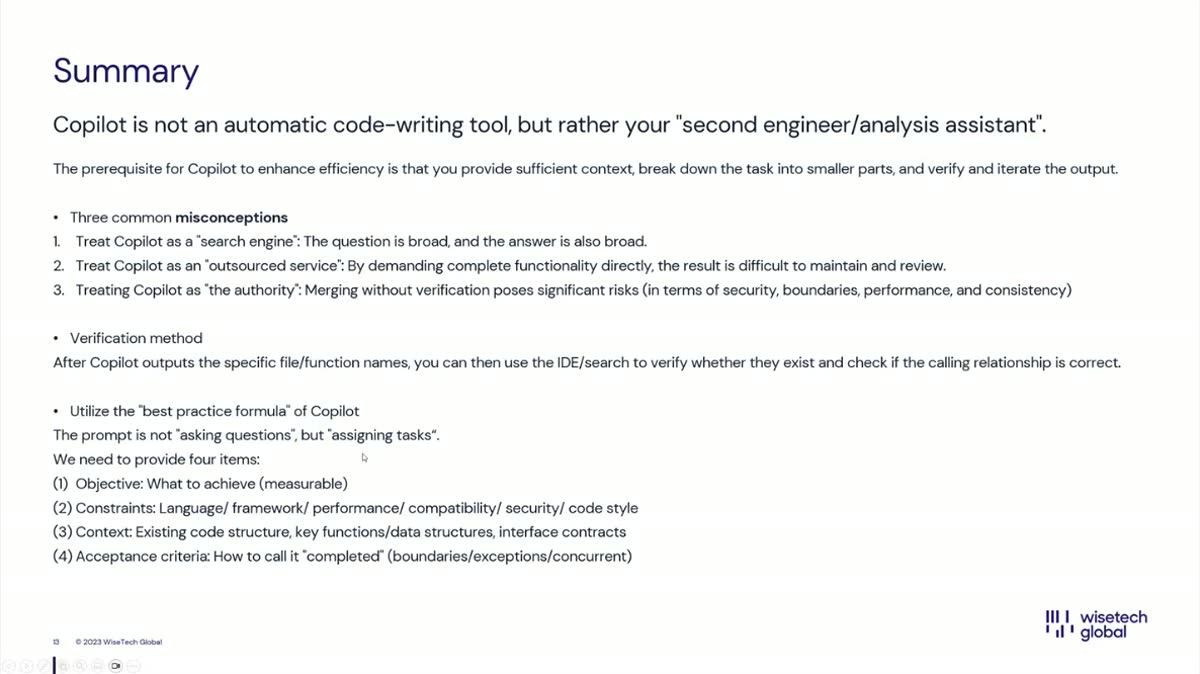
The presentation framed Copilot as a second engineer or analysis assistant, not an automatic code-writing tool.
Three common misconceptions:
- Copilot as a search engine: broad questions tend to produce broad answers.
- Copilot as an outsourced service: requesting a complete feature in one step often produces output that is difficult to maintain and review.
- Copilot as the authority: merging unverified output creates security, boundary, performance, and consistency risks.
A stronger task brief includes:
- Objective: the measurable outcome to achieve
- Constraints: language, framework, performance, compatibility, security, and code style
- Context: relevant structure, functions, data types, interfaces, and contracts
- Acceptance criteria: boundaries, exceptions, concurrency behavior, tests, and the definition of “done”
4. AI Sharing Retrospective and “The Bitter Lesson”
Presented by: Damien Li
Damien reviewed the internal AI Sharing journey from April 2025 to January 2026, covering 27 sharing sessions. The retrospective revisited tools, implementation patterns, industry reports, and experiments across AI-assisted development, model infrastructure, evaluation, computer use, MCP, AI avatars, and creative applications.
Rich Sutton's “The Bitter Lesson” provided a unifying principle: methods that scale with computation and general learning tend to outperform approaches that rely heavily on hand-crafted domain knowledge. Applied to personal development, the session emphasized durable capabilities such as learning, critical thinking, experimentation, and problem solving over memorizing short-lived tool-specific tricks.
Examples revisited during the retrospective:
- AI avatar and video tools such as TopView, Tavus, Dreamina, and Lovart
- Context engineering and production-oriented vibe coding
- vLLM concepts such as KV cache and paged attention
- Agent evaluation tools including TruLens, Flowise evaluators, DeepEval, and Promptfoo
- Coding models, OpenAI platform updates, Gemini Computer Use, and MCP tooling
5. OpenSkills and Agent Skills Demo
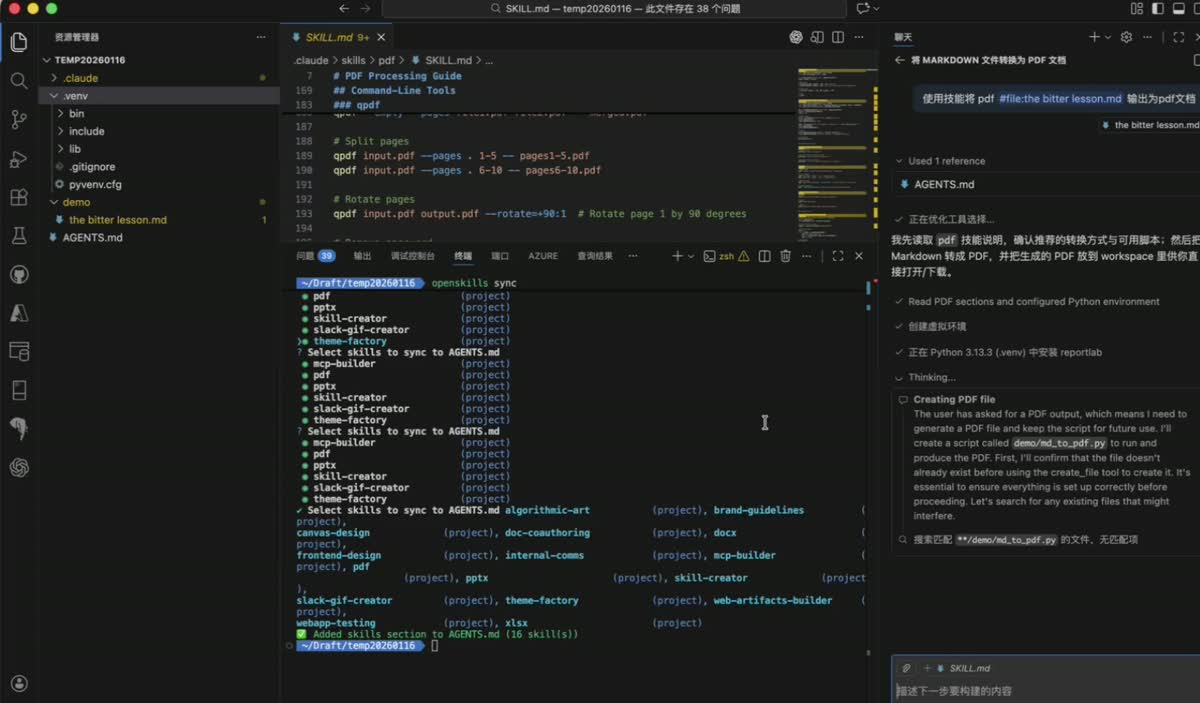
The hands-on section demonstrated how skill packages can turn a repeatable workflow into instructions and supporting resources that an AI coding agent can discover and execute.
Demonstrated flow:
- Install the
openskillscommand-line tool. - Create a project skill directory such as
.claude/skills. - Bring in reference skills, including examples from Anthropic's skills repository.
- Run
openskills syncto expose selected skills through the project'sAGENTS.md. - Ask the coding agent to use the PDF skill to convert a Markdown copy of “The Bitter Lesson” into a PDF.
- Let the agent read the skill instructions, prepare the required environment, and execute the documented workflow.
Typical skill contents:
SKILL.mddescribing when and how the skill should be used- Optional scripts that perform reliable, repeatable operations
- Optional templates, reference files, and assets
- Clear inputs, outputs, validation steps, and failure handling
The demo showed how skills move useful prompting knowledge out of one-off conversations and into versioned, reusable project capabilities.
6. Future Direction for AI Sharing
The closing discussion proposed a more work-oriented format for future sessions:
- Run AI Sharing on a monthly cadence so teams have more time to prepare.
- Invite groups to present real day-to-day workflows and measurable productivity improvements.
- Encourage discussion and shared problem solving instead of one-way presentations.
- Expand participation beyond the Nanjing office by inviting colleagues from other regions.
📊 Presentations & Materials
Session Recording
🎥 Watch the January 16, 2026 recording
Recording highlights:
- GitHub Copilot web portal setup and repository context
- Two production-inspired defect investigation examples
- Prompt structure, verification, and common Copilot misconceptions
- Review of 27 internal AI Sharing sessions
- “The Bitter Lesson” and scalable learning methods
- OpenSkills installation, synchronization, and a PDF skill demo
- Discussion of the next phase of AI Sharing
No standalone presentation files were supplied with the recording. The screenshots above were captured from the session for reference.
🔗 Featured Resources
GitHub Copilot
- GitHub Copilot - Product overview and entry point
- GitHub Copilot documentation - Setup, usage, and responsible-use guidance
Agent Skills
- Use Agent Skills in VS Code - Agent Skills customization guidance
- Anthropic Skills repository - Reference skill examples used in the demonstration
Learning and Evaluation
- The Bitter Lesson - Rich Sutton's essay on scalable general methods
- TruLens - Evaluation and observability for LLM applications
- DeepEval - Open-source LLM evaluation framework
- Promptfoo - Testing and evaluation for prompts, agents, and models
🎮 Quiz Activity
No structured quiz activity or scored quiz was included in the supplied recording.
🏆 Quiz Results & Winners
No Session 8 quiz ranking was published with the recording, so no winners are listed for this session.
🔑 Key Insights
- Context quality determines output quality: attach the smallest set of repositories, files, logs, and constraints that fully explains the task.
- Investigation should precede generation: ask AI to map evidence and call paths before requesting a patch.
- Verification is part of the workflow: confirm symbols, boundaries, tests, security implications, and runtime behavior in the real system.
- General capabilities compound: learning, experimentation, and scalable methods remain valuable as individual tools change.
- Skills make good workflows reusable: codify successful instructions, scripts, and validation steps instead of recreating them in every chat.
- Sharing works best when grounded in daily work: concrete team examples make AI adoption easier to evaluate and repeat.
📚 Further Learning
For Developers
- Rework one broad Copilot request into objective, constraints, context, and acceptance criteria.
- Practice using logs and stack traces to request an investigation plan before code changes.
- Package a repeated engineering workflow as an Agent Skill with explicit validation steps.
For Teams
- Collect successful AI-assisted workflows and measure their effect on delivery or quality.
- Review generated changes with the same rigor as human-authored changes.
- Nominate a real team workflow for a future AI Sharing session.
🙏 Acknowledgments
Special thanks to:
- Gordon Zhou for the production-focused GitHub Copilot demonstrations
- Damien Li for the AI Sharing retrospective and OpenSkills demonstration
- Aimee Li for hosting and facilitating the session
- All participants for the discussion and continued knowledge sharing
Use Copilot as an analysis partner
Start with evidence and a focused investigation objective. Ask Copilot to show its reasoning through concrete files, symbols, and call relationships, then verify those references before acting on the result.
No quiz results
The supplied recording did not contain a scored quiz or winner announcement, so this page intentionally does not invent leaderboard data.
Session 8 | January 16, 2026 | Practical GitHub Copilot & Agent Skills | Gordon Zhou, Damien Li