
Session 5: AI Agents, Workflows & n8n
Date: October 17, 2025
Duration: 2 hours
Participants: WiseTech Global Team
Recording: Watch Session Recording
📋 Overview
In this comprehensive session, we explored the landscape of AI application development, from understanding where startup dollars go in AI spending to building practical AI agents with n8n. The session covered context engineering principles, AI agent fundamentals, and provided hands-on demonstrations of creating intelligent assistants with memory and tool capabilities using the Amap (高德地图) MCP service.
🎯 Key Topics Covered
1. AI Application Spending Report
Understanding the economics of AI applications is crucial for strategic decision-making.
Key Reports:
- a16z: The AI Application Spending Report - Where Startup Dollars Really Go
- OpenAI Top 30 Customers: 1 Trillion Tokens Usage
- a16z: AI Application Spending Research (Chinese)
Key Insights:
- Infrastructure costs dominate early-stage AI applications
- Token consumption patterns reveal usage optimization opportunities
- Strategic resource allocation is critical for AI product success
2. Context Engineering
Context engineering is the art and science of optimizing how we provide information to AI models for better results.
Featured Resources:
- YouTube: Context Engineering Masterclass
- LangChain + Manus: Best Context Engineering Explanation (Chinese)
- Manus 1.5 Release
Core Principles:
- Precision over Volume: More context isn't always better - relevance matters
- Structured Information: Organize context hierarchically for better comprehension
- Dynamic Context: Adapt context based on conversation flow and user intent
- Memory Integration: Leverage conversation history effectively
3. AI Agents & Workflow Platforms
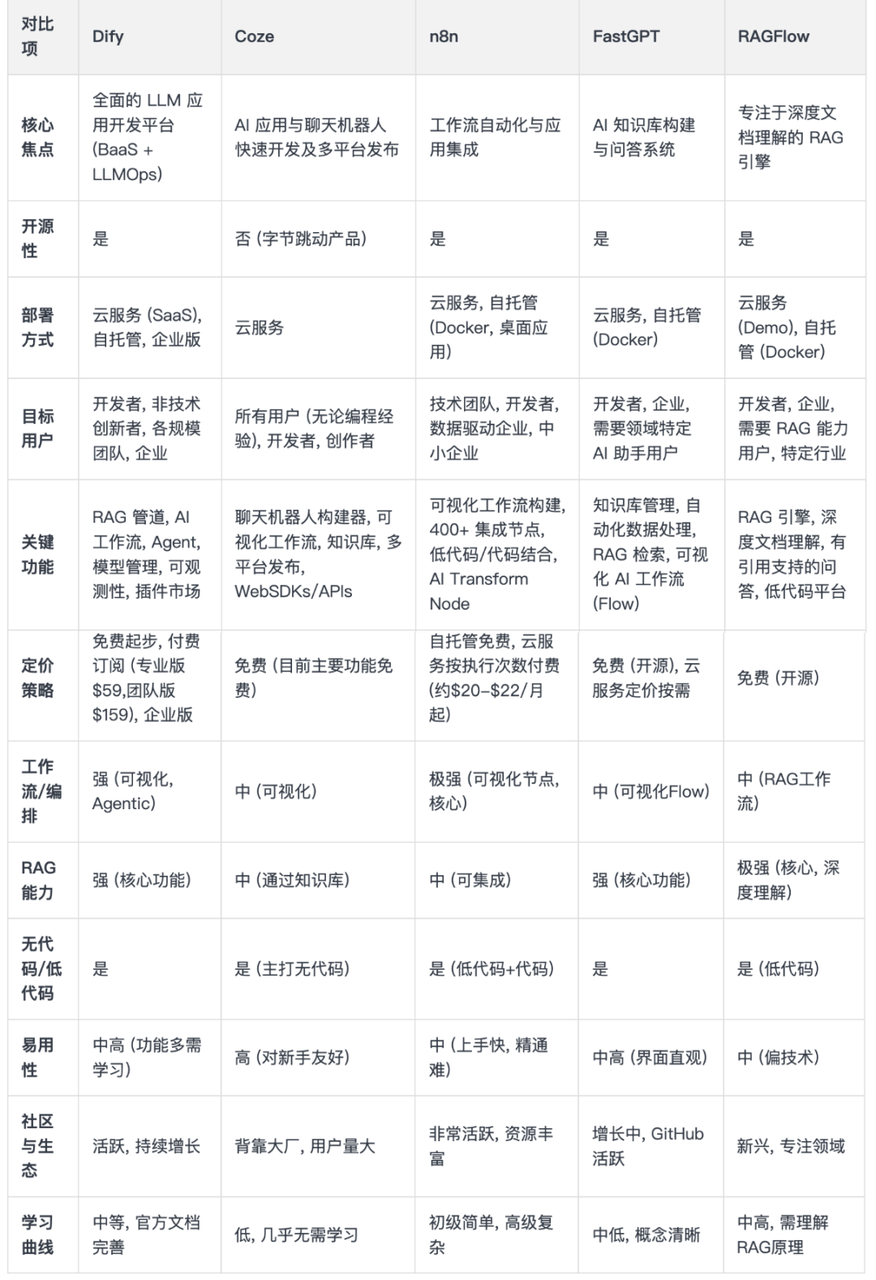
Platform Comparison:
| Platform | Type | Strengths | Use Cases |
|---|---|---|---|
| ChatGPT AgentKit | Framework | Official OpenAI support | Prototyping, research |
| LlamaIndex | Framework | Data integration focus | RAG applications |
| Firecrawl | Tool | Web scraping + agents | Data collection agents |
| n8n | Workflow | Visual, open-source | Business automation |
| Coze | Platform | Low-code | Rapid prototyping |
| Dify | Platform | Enterprise features | Production deployments |
Key Resources:
- LlamaIndex Multi-Agent Systems
- Firecrawl Open Agent Builder
- n8n GitHub Repository
- Dify GitHub Repository
4. Understanding n8n
From "nodemation" to "n8n"
The founder Jan Oberhauser originally wanted to name this tool nodemation.
Name Construction:
nodemation = node + automation
    │          │        │
    │          │        └─ Automation
    │          └────────── Node (dual meaning)
    │
    └─ ① Built with Node.js
② Node-based visual interfaceBut Jan thought the name was too long and not concise enough. So he used a clever approach:
nodemation
n  o  d  e  m  a  t  i  o  n
└───────── 8 letters ─────────┘

↓ Replace middle 8 letters with the number 8

n8n ✨Numeronym Examples:
| Original | Abbreviation | Explanation |
|---|---|---|
| Kubernetes | K8s | 8 letters between K and s |
| Internationalization | i18n | 18 letters between i and n |
| Localization | l10n | 10 letters between l and n |
| nodemation | n8n | 8 letters between n and n |
5. Traditional AI vs AI Agent
Traditional AI:
- You ask: "What's the weather today?"
- It answers: Weather information
AI Agent:
- You say: "Help me plan a weekend trip"
- It will:
- Check weather forecast
- Recommend suitable destinations
- Find transportation options
- Even book hotels for you
Core Difference:
- Traditional AI = Information retriever
- AI Agent = Autonomous thinking and acting intelligent assistant
Formula:
Agent = Loop (LLM + Tools + Context + Memory)Capability Comparison:
| Dimension | Traditional AI | AI Agent |
|---|---|---|
| Response Mode | Passive answers | Active execution |
| Processing Depth | Single-turn dialogue | Multi-step planning |
| Decision Making | Fixed process | Dynamic decisions |
| Capability Range | Single function | Tool invocation |
6. Building Your First AI Agent with n8n
Step 1: Understanding Agent Architecture
Three-Layer Architecture:
- Trigger Layer: How to start? (Chat/Webhook/Schedule)
- Processing Layer: How to think? (LLM + Memory)
- Execution Layer: How to act? (Tools)
Modular Design Benefits:
- Flexibly replace any layer without affecting others
- Quickly locate problems at specific layers
- Reuse existing modules to build new systems
Step 2: Adding AI Agent Node
- Open n8n workflow canvas
- Click "Add Node" button (+)
- Search for "AI Agent"
- Select the AI Agent node
The AI Agent node comes with a chat trigger, enabling interactive conversation.
Step 3: Three Connection Points
- Left: Chat Model - Agent's "brain" (determines intelligence level)
- Middle: Memory - Agent's "memory bank" (remembers conversation history)
- Right: Tools - Agent's "toolbox" (grants execution capabilities)
7. Adding Memory to Your Agent
Memory Storage Options:
| Storage Type | Use Case | Advantages | Disadvantages |
|---|---|---|---|
| Simple Memory | Testing/Development | Zero configuration | Lost on restart |
| Redis | High concurrency | Fast performance | Requires maintenance |
| MongoDB | Complex data | High flexibility | Complex setup |
| PostgreSQL | Enterprise apps | Strong reliability | Resource intensive |
Progressive Upgrade Principle:
- Start with the simplest (Simple Memory)
- Upgrade when encountering limitations
- Don't over-design
Memory Configuration:
- Context Window Size: 10 (remember last 10 conversation turns)
- Session ID: Automatically managed for chat triggers
{{ $json.sessionId }}
8. Integrating Tools - Amap MCP Service
What is MCP?
MCP (Model Context Protocol) is a standardized protocol that allows AI models to safely access external tools and services.
MCP Advantages:
- ✅ Standardized interface - Unified calling method
- ✅ Plug-and-play - No complex configuration
- ✅ Feature-rich - Multiple capabilities in one service
Amap (高德地图) MCP Capabilities
- Weather Query - Get real-time weather and forecasts for any city
- Address Search - Find specific addresses and coordinates
- Nearby Search - Find restaurants, hotels, gas stations, etc.
- Route Planning - Calculate optimal travel routes
- Administrative Divisions - Get city and district information
9. System Prompt Design
Understanding System Message vs User Message:
System Message (System Prompt):
- Defines AI's identity, behavior rules, and working methods
- Users can't see it, but it affects all AI responses
- Content: Role setting, output format, tool usage rules
- Scope: Entire conversation session
User Message (User Prompt):
- User's specific questions or instructions
- Content: Specific questions, needs, dialogue content
- Scope: Current conversation turn
Example System Prompt for Weather Agent:
You are an intelligent life assistant equipped with Amap tools. Please follow these requirements:
## Basic Principles
1. Always reply in Chinese
2. Maintain professional yet friendly tone
3. Be honest if uncertain about answers
## Tool Usage Guide
### Weather Query
- Keywords: weather, temperature, rain, sunny, etc.
- Action: Call weather query tool
- Output Format: Strictly follow this template for personalized weather forecast
**Weather Forecast Output Template:**
1. 🌤️ Today's Weather Overview
2. 🌡️ Temperature and Feels-Like Temperature
3. 👔 Clothing Suggestions
4. 🚗 Travel Reminders
5. 💡 Life Tips
Requirements:
- Vivid and friendly language suitable for daily reading
- Include practical life advice
- Use emojis for readability
- Total length: 200-300 characters
### Location Query
- Keywords: where, address, how to get, route, nearby, around, find, etc.
- Action: Call address search, nearby search, or route planning tools
- Output Format:
- Use 📍 to mark address location
- Use ⭐ for rating information
- Use 🚶♂️🚗 for distance and transportation
- Provide **specific numbers and distances**
- Sort recommendations by **distance and rating**10. Practical Use Cases
Scenario 1: Trip Planning
- User: "Going to Shanghai tomorrow for business, check the weather for me"
- Agent Actions:
- Calls weather query tool
- Formats response with travel suggestions
- Provides clothing recommendations
Scenario 2: Location Search
- User: "Find nearby coffee shops"
- Agent Actions:
- Detects current location
- Searches nearby coffee shops
- Returns sorted results with ratings and distances
Scenario 3: Complex Query
- User: "I'm at Nanjing South Station, need to go to Confucius Temple, what's the weather like?"
- Agent Actions:
- Queries weather for destination
- Calculates route and travel time
- Provides comprehensive travel plan
📊 Presentations & Materials
Session Recording
Recording Highlights:
- AI spending report analysis
- Context engineering principles
- Live n8n agent building demo
- Amap MCP integration walkthrough
- System prompt design best practices
- Real-world use case demonstrations
Demo Configuration
📄 Download n8n Workflow Configuration
This configuration file contains the complete n8n workflow demonstrated in the session, including:
- AI Agent node with Amap MCP integration
- Simple Memory configuration
- System prompt templates
- Tool configurations
To import:
- Open your n8n instance
- Click "Import from File"
- Select the downloaded JSON file
- Configure your API keys and settings
🔗 Featured Resources
Industry Reports & Research
- a16z AI Application Spending Report - Startup spending analysis
- OpenAI 1T Tokens Customers - Usage patterns
- a16z Report (Chinese) - Translated insights
Context Engineering
- YouTube: Context Engineering - Video tutorial
- LangChain + Manus (Chinese) - Best practices
- Manus 1.5 Release - Latest features
AI Agent Platforms & Tools
- ChatGPT AgentKit - OpenAI's official framework
- LlamaIndex - Data integration platform
- LlamaIndex Multi-Agent - Production framework
- Firecrawl - Web scraping tool
- Firecrawl Agent Builder - Open source builder
- n8n - Workflow automation platform
- n8n GitHub - Source code
- Coze - Low-code agent platform
- Dify - Enterprise AI platform
- Dify GitHub - Open source code
🎮 Quiz Activity
Quiz Details
Total Questions: TBD
Duration: 15 minutes
Topics Covered:
- AI agent fundamentals
- Context engineering principles
- n8n workflow design
- MCP protocol understanding
- System prompt engineering
🏆 Quiz Results & Winners
🥇 First Place
Winner: Leo Qian
🥈 Second Place
Winner: Anthony Liang
🥉 Third Place
Winner: Hunter Yang
📊 Full Results
| Rank | Name |
|---|---|
| 🥇 1 | Leo Qian |
| 🥈 2 | Anthony Liang |
| 🥉 3 | Hunter Yang |
🔑 Key Insights
- Agent Formula: Understanding
Agent = Loop (LLM + Tools + Context + Memory)provides a systematic approach to agent design - Modular Architecture: Three-layer architecture (Trigger, Processing, Execution) enables flexible and maintainable agent systems
- Progressive Development: Start simple (Simple Memory) and upgrade based on actual needs, avoiding over-engineering
- Prompt Engineering: Well-designed system prompts are crucial for consistent and reliable agent behavior
- MCP Standardization: Model Context Protocol provides a unified way to integrate external tools and services
- Context Engineering: Quality over quantity in context provision leads to better AI responses
💬 Practical Takeaways
For Developers:
- Start with n8n's visual interface for rapid prototyping
- Use MCP services for standardized tool integration
- Apply the three-layer architecture thinking to all agent designs
- Test memory configurations progressively
For Product Teams:
- Understand AI application spending to optimize costs
- Consider agent capabilities when planning AI features
- Design user experiences around agent workflows
- Leverage existing platforms before building custom solutions
For Everyone:
- AI Agents are fundamentally different from chatbots
- Tool integration multiplies agent capabilities
- Memory enables continuity in conversations
- Context engineering improves response quality
📚 Further Learning
Next Steps:
- Explore n8n's official documentation and templates
- Experiment with different MCP services
- Study prompt engineering techniques
- Build a personal assistant agent as practice
Recommended Resources:
- n8n Academy courses
- MCP specification documentation
- LangChain agent tutorials
- OpenAI prompt engineering guide
🎯 What's Next?
Looking forward to Session 6, where we'll explore:
- Advanced agent orchestration patterns
- Multi-agent collaboration systems
- Production deployment strategies
- Monitoring and observability for AI agents
Want to Try This Yourself?
All demo configurations and code samples are available. Start with n8n Community Edition (free) and experiment with building your first agent!
Questions or Feedback?
Reach out to Damien Li or the Crossroad AI team for discussions, clarifications, or collaboration opportunities!
Session 5 | October 17, 2025 | AI Agents, Workflows & n8n | Damien Li